Compliance
Defects
Work the faults raised by walkaround checks through their lifecycle, keep unsafe vehicles off the road, and track fixes against a live SLA countdown.
Walkthrough Defects1 screenshots
- Every fault, tracked to a fix
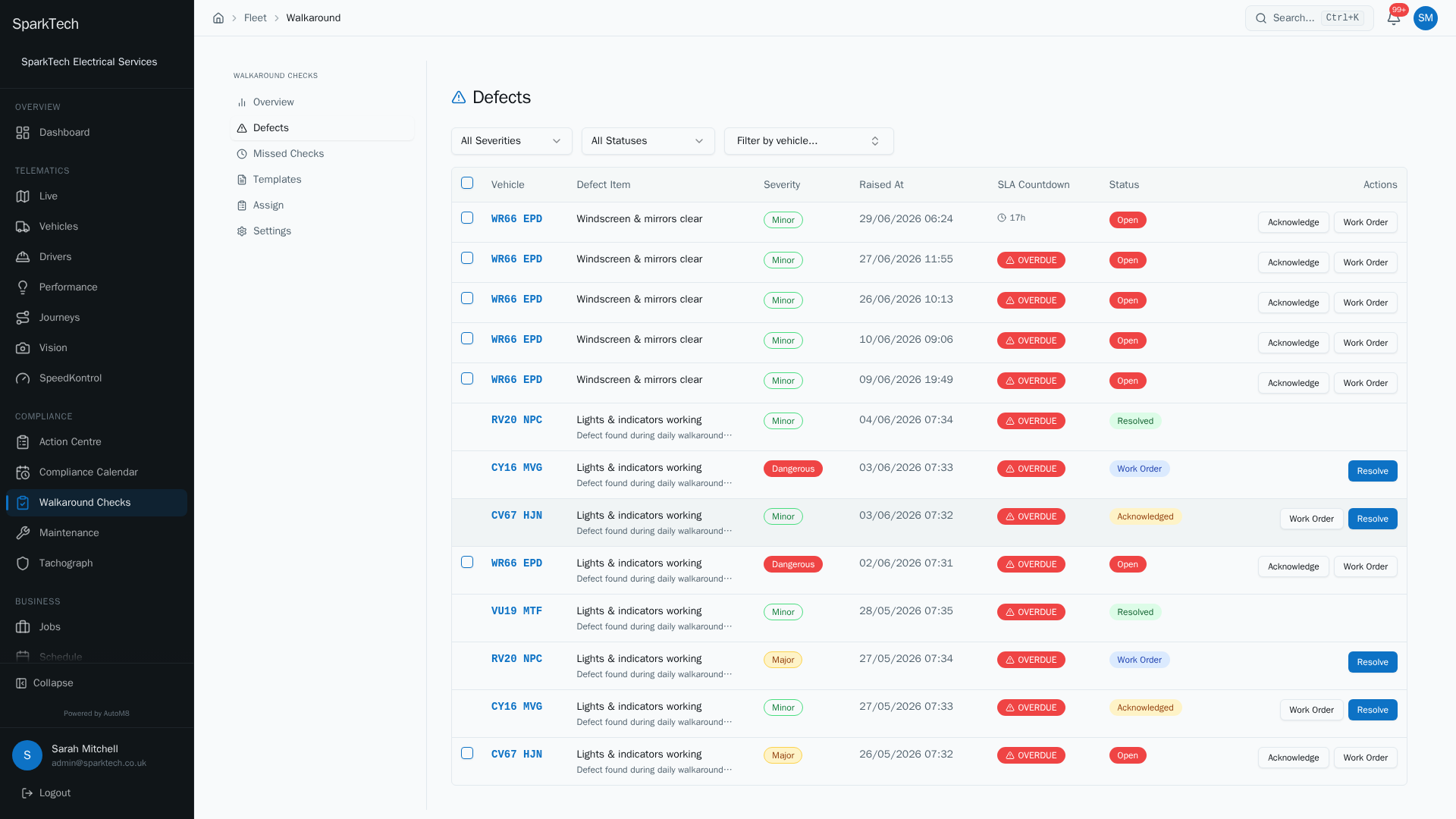
Open Compliance then Walkaround Checks then Defects. Each fault raised by a check shows its vehicle, severity and a live SLA countdown, and moves from Open to Acknowledged to In Progress to Resolved.
A defect is a fault found on a vehicle. Defects are raised automatically when a walkaround check item fails, and AutoM8 tracks each one from the moment it is reported to the moment it is fixed.
Permissions. Seeing defects needs Vehicles View. Acknowledging a defect or raising a work order needs Defects Manage (in the FMS (Fleet Management) group). Resolving a defect needs the Walkaround Submit permission - but a view-only role sees the queue with no action controls.
You reach the defects queue at Compliance > Walkaround Checks, on the Defects tab.
The defect queue
The queue is one row per defect, showing the vehicle, the defect item, the severity, when it was raised, its SLA countdown, and its status. Filter the list with three controls:
- Severity - All, Dangerous, Major or Minor.
- Status - All, Open, Acknowledged, In Progress or Resolved.
- Vehicle - narrow to a single vehicle.
The queue is sorted with the most urgent defects first.
The defect lifecycle
Every defect moves through four states. Which actions you see on a row depend on where it is and your permissions.
| Status | What it means | What you can do next |
|---|---|---|
| Open | Just reported, nobody has looked at it. | Acknowledge it, or raise a work order. |
| Acknowledged | Someone has picked it up. | Raise a work order, or resolve it. |
| Work Order (shown as In Progress) | A work order has been raised - a maintenance job to fix the fault (see Service and maintenance scheduling). | Resolve it once fixed. |
| Resolved | Fixed and closed, with notes. | Nothing further. |
Who can do this: acknowledging and raising work orders need Defects Manage; resolving needs at least Walkaround Submit.
Raising a work order creates a maintenance job for the fix, so it flows into your maintenance work.
The SLA countdown
Each defect has a target time to fix it - the SLA (the time you have set to fix the fault) - set per severity in the walkaround settings (in hours). The SLA Countdown column is live and colour-coded so nothing is forgotten:
- OVERDUE - a red badge once the deadline has passed.
- Minutes left - shown in red once under an hour remains.
- Hours left - shown in amber when under six hours remain, otherwise in plain text.
Keeping unsafe vehicles off the road
When a check finds a Dangerous defect, AutoM8 can automatically set the vehicle to Off road so it is not used until the fault is fixed. Whether this is enforced or is just a warning is your choice, in the walkaround settings.
A vehicle’s roadworthy status is one of:
| Status | Meaning |
|---|---|
| Roadworthy | Safe to drive. |
| Off road | Taken off the road, usually by a dangerous defect. |
| Pending inspection | Awaiting a check before returning to service. |
Resolving the last open dangerous defect returns the vehicle to Roadworthy.
Bulk acknowledge
Who can do this: any role with the Defects Manage permission.
To clear a batch quickly, tick several open defects and choose Bulk Acknowledge to acknowledge them all at once.
Troubleshooting
Why is a defect blocking the vehicle? A Dangerous defect can set the vehicle to Off road, so it cannot be used until the fault is fixed - this happens when your account uses the hard-block setting. Resolving the last open dangerous defect returns the vehicle to Roadworthy.
Why can’t I acknowledge a defect or raise a work order? These actions need the Defects Manage permission. A view-only role sees the queue but no action controls.
Why did resolving a defect not clear the vehicle’s off-road status? The vehicle only returns to roadworthy once the last open dangerous defect is resolved - if another dangerous defect is still open, it stays off road until that one is closed too.
Why can’t I see defects at all? Check your permissions and visibility scope first, then whether the vehicle’s licence is frozen. The general troubleshooting page covers the rest.
Related
- Daily walkaround checks.
- Service and maintenance scheduling.
- Tracking defects to resolution is part of the compliance workflow in AutoM8’s fleet management software.